Voltex Performance™ One powerful engine. .
Voltex Performance is a powerful game performance booster for Windows 10 and 11. It increases FPS, reduces lag and stuttering, and optimizes your PC in real time. With smart game detection and safe system tuning, Voltex delivers smoother gameplay without kernel drivers, injections, or permanent system changes.
Voltex reviews on Trustpilot
We use Trustpilot so players can leave public, independent reviews of Voltex Performance. Click the widget below to see our latest reviews.
Measured with CapFrameX (frametime analysis).
To keep our performance claims transparent and reproducible, we measure using CapFrameX — a trusted tool for frametime capture and stutter analysis. You can verify the results yourself by running the same scene twice: once with Voltex enabled and once without, then comparing the data on your own hardware. Download it at capframex.com.
Less stutter. Better frame pacing.
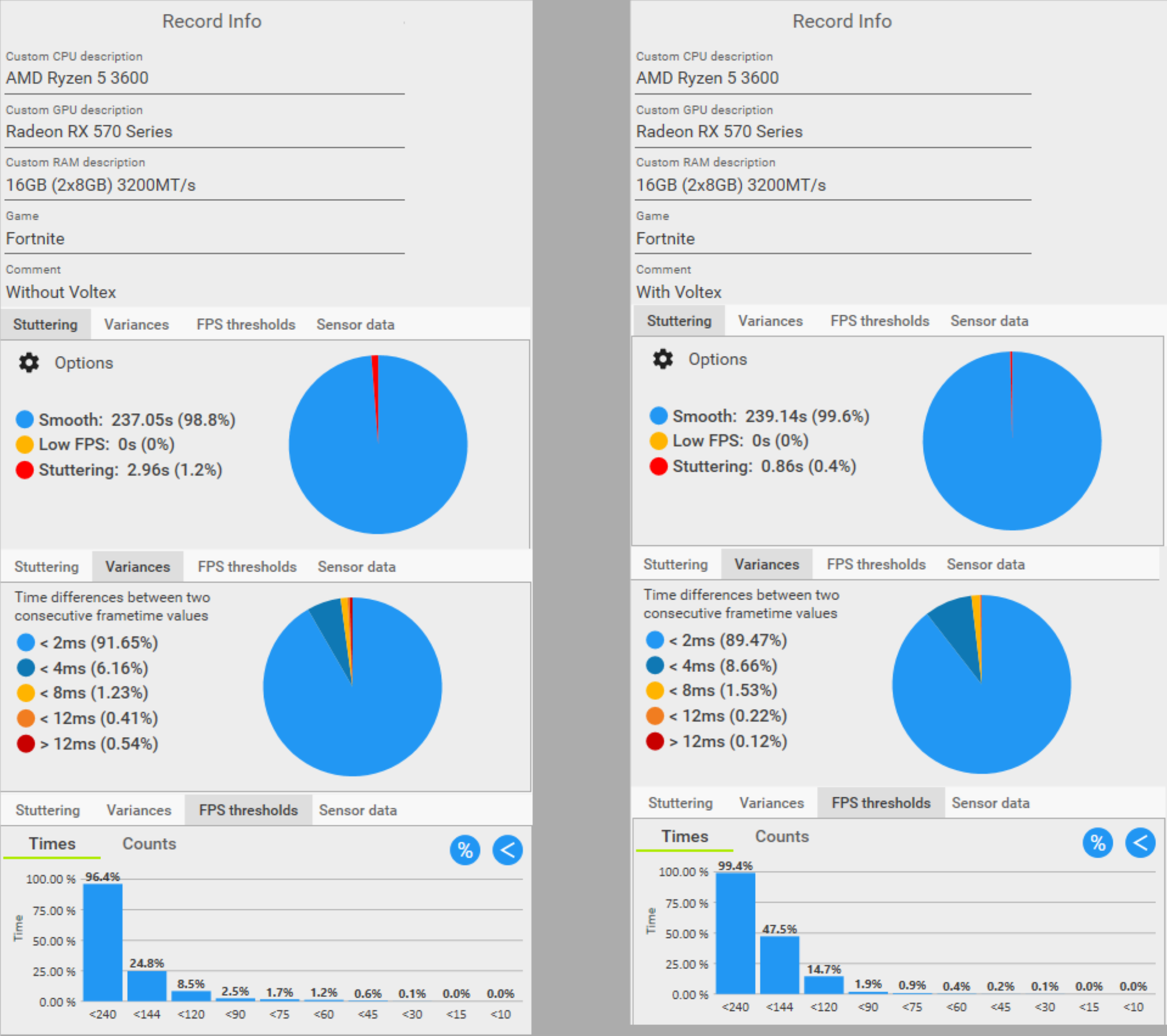
FPS alone doesn’t tell the full story — frametime stability is what makes a game feel smooth. In this Fortnite test on a Ryzen 5 3600 system, we used CapFrameX to measure stutters, spike behavior, and overall frame pacing.
With Voltex enabled, stutters were reduced by about 71% and the smoothness score reached around 99.6% in the captured scene — resulting in noticeably steadier gameplay.
FPS consistency also improved by roughly 3.1%, and severe frametime spikes were significantly reduced, helping the game feel more responsive during fast fights and movement.
Fewer hitches, stronger lows.
Warzone is very sensitive to frametime spikes. In this test on a Ryzen 5 3600 + RX 570 system, we measured stutter time, smoothness, and critical low FPS (0.1% lows) using CapFrameX.
With Voltex enabled, stutters were reduced by about 55.6% — from roughly 1.69 seconds total stutter time to about 0.75 seconds in the captured run. That translates to fewer visible hitches during heavy action.
The 0.1% lows improved by approximately 47.7%, while smoothness rose to around 99.7% and frame consistency reached about 87.36% in this scene.

Improved playability under heavy stutter.
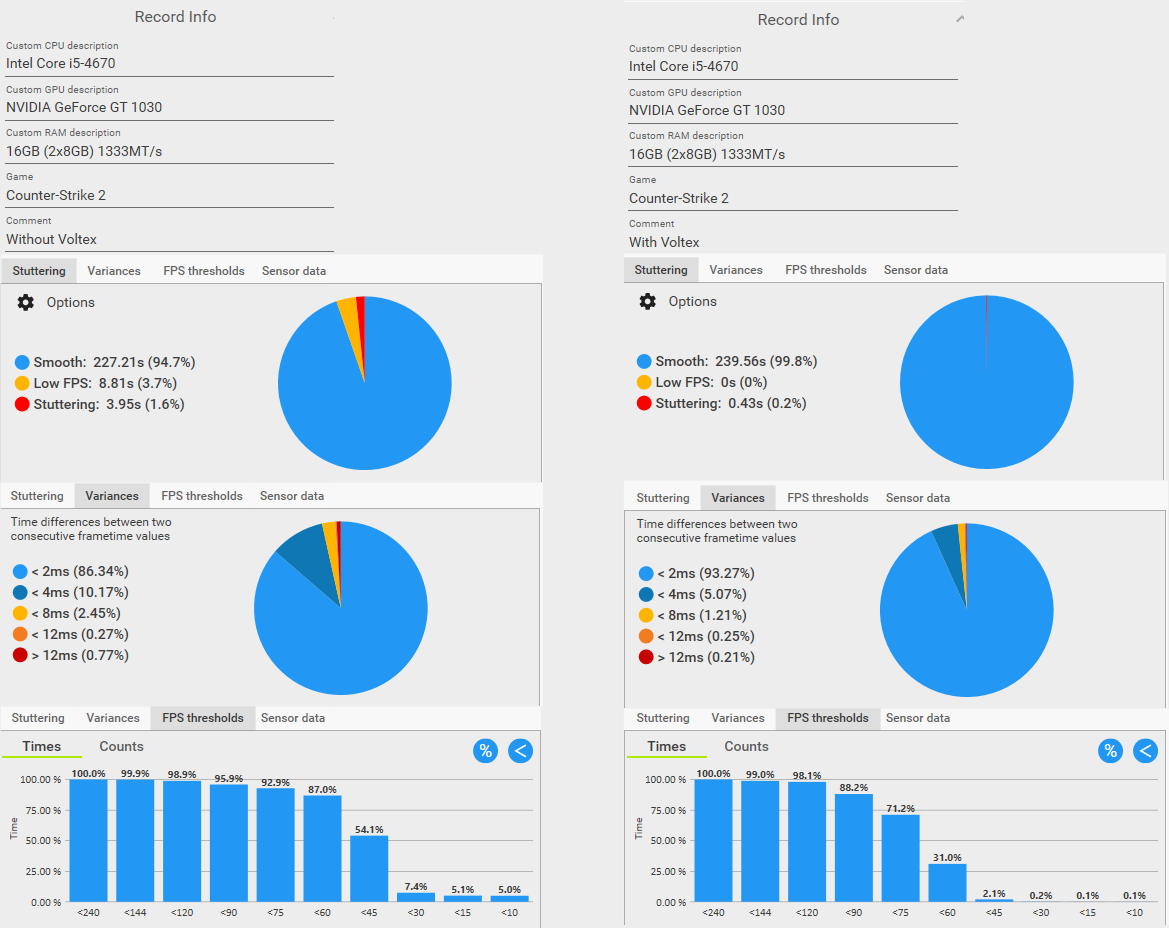
This CS2 run was captured on a system showing severe instability and heavy stuttering. CapFrameX highlights how frametime spikes affect playability — especially in competitive games.
With Voltex enabled, the 0.1% lows increased from 3.8 to 21.4 FPS in the captured test, and total stutter time dropped by 89.1% to about 0.43 seconds.
Smoothness reached 99.8% with frame pacing around 93.27% in this run, reducing freezing and making gameplay significantly more stable.
Voltex Performance Engine – Technical Whitepaper
A technical deep dive into how Voltex improves frametime stability, reduces stutters, and optimizes Windows safely — without kernel drivers, injections, or permanent system changes.
What’s inside the whitepaper
This whitepaper explains Voltex’s performance philosophy (frametime stability first), the optimization layers applied at runtime, and how all results are validated using independent and reproducible benchmark tooling.
- Clear performance targets: improved frametime stability, fewer stutters, and more responsive gameplay.
- Safe-by-design optimization: no registry damage, no kernel drivers, and no permanent Windows modifications.
- Real-time system balancing: dynamic CPU, RAM, and process priority management during gameplay.
- Intelligent game detection: adaptive behavior based on the active game and system workload.
- Reproducible benchmarks: A/B testing methodology using identical scenes and CapFrameX frametime analysis.
- Security transparency: clear documentation of what Voltex does — and what it explicitly never does.
How Voltex improves gaming performance.
Voltex is a Windows performance engine that reduces background interference, stabilizes frametimes, and applies safe, reversible optimizations — automatically or with full manual control.
Auto Game Detection & Pre-Launch Boost
Use Voltex fully automatically, or run a quick pre-launch boost before you start playing.
- Detects popular games and applies the right profile automatically.
- Per-game profiles tuned to your hardware tier for consistent results.
- Optional Pre-Launch wizard for a clean, ready-to-play system state.
Adaptive In-Session Optimizer
During gameplay, Voltex reacts to real system load and focuses on smoothness — not just average FPS.
- Adaptive modes to match competitive or heavy single-player workloads.
- Targets stutters, frametime spikes, and weak 1% lows.
- Responds to CPU pressure, background load, and memory contention.
- Optional advanced tuning when it’s safe for the active game.
CPU & Memory Optimization (No Drivers)
Performance improvements using safe, reversible system controls — without kernel drivers or injections.
- Optimizes the active power profile for gaming responsiveness.
- Balances CPU behavior to reduce unnecessary frequency swings.
- Monitors memory pressure and applies safe cleanup only when needed.
Windows Security & Background Scan Awareness
Voltex helps reduce background interruptions by prioritizing gameplay during high load scenarios.
- Reduces performance impact by coordinating with normal Windows behavior.
- Focuses on keeping CPU time available when games need it most.
- Designed to stay compatible with standard Windows security features.
Anti-Cheat Compatibility Mode
Voltex avoids intrusive methods and adapts its behavior when anti-cheat systems are present.
- No DLL injection, no hooks, no tampering with game memory.
- Automatically disables risky tweaks when anti-cheat is detected.
- Optional FPS limiting support through safe external tooling.
Benchmark Tools & Session Reports
Measure the difference on your own hardware with clear before/after reporting.
- Baseline vs boosted comparisons to validate improvements.
- Tracks CPU, memory, and frametime behavior during gameplay.
- Session summaries showing smoothness and stability trends.
Background App Management
Voltex reduces background interference without touching your game process directly.
- Identifies heavy background apps and reduces their impact during play.
- Keeps your game and essential tools responsive under load.
- Uses safe, standard Windows process controls — no injections.
Streamer & Creator Mode
Game, stream, and chat smoothly without Voltex breaking your workflow.
- Protects key apps like streaming and voice tools from interference.
- Designed for stable audio, stable encode, and stable gameplay.
- Optional “always-on” creator mode in the Control Center.
Optional Windows Tweaks & Restore Tools
Carefully selected system tweaks with clear restore options — designed for stability first.
- Optional gaming-related Windows toggles with safe rollback.
- Helps reduce latency sources without breaking normal PC usage.
- Restore tools included if you want to revert changes anytime.
Typical performance effects observed with Voltex.
Indicative ranges based on internal testing and benchmark validation. Actual results vary depending on game engine, hardware configuration, and background workload.
| Metric | Without Voltex | With Voltex enabled | |
|---|---|---|---|
| Average FPS | Baseline | Up to ~5–20% increase | |
| 1% low FPS | Frequent dips | Noticeably stronger lows | |
| CPU spikes | Short saturation peaks | Shorter and less disruptive | |
| Memory pressure | Background-heavy usage | Reduced during gameplay | |
| Frametime variance | Higher fluctuation | More consistent pacing | |
| Input responsiveness | Inconsistent under load | More stable and predictable | |
| Overall system feel | Occasionally sluggish | Smoother and more responsive |
See Voltex in action.
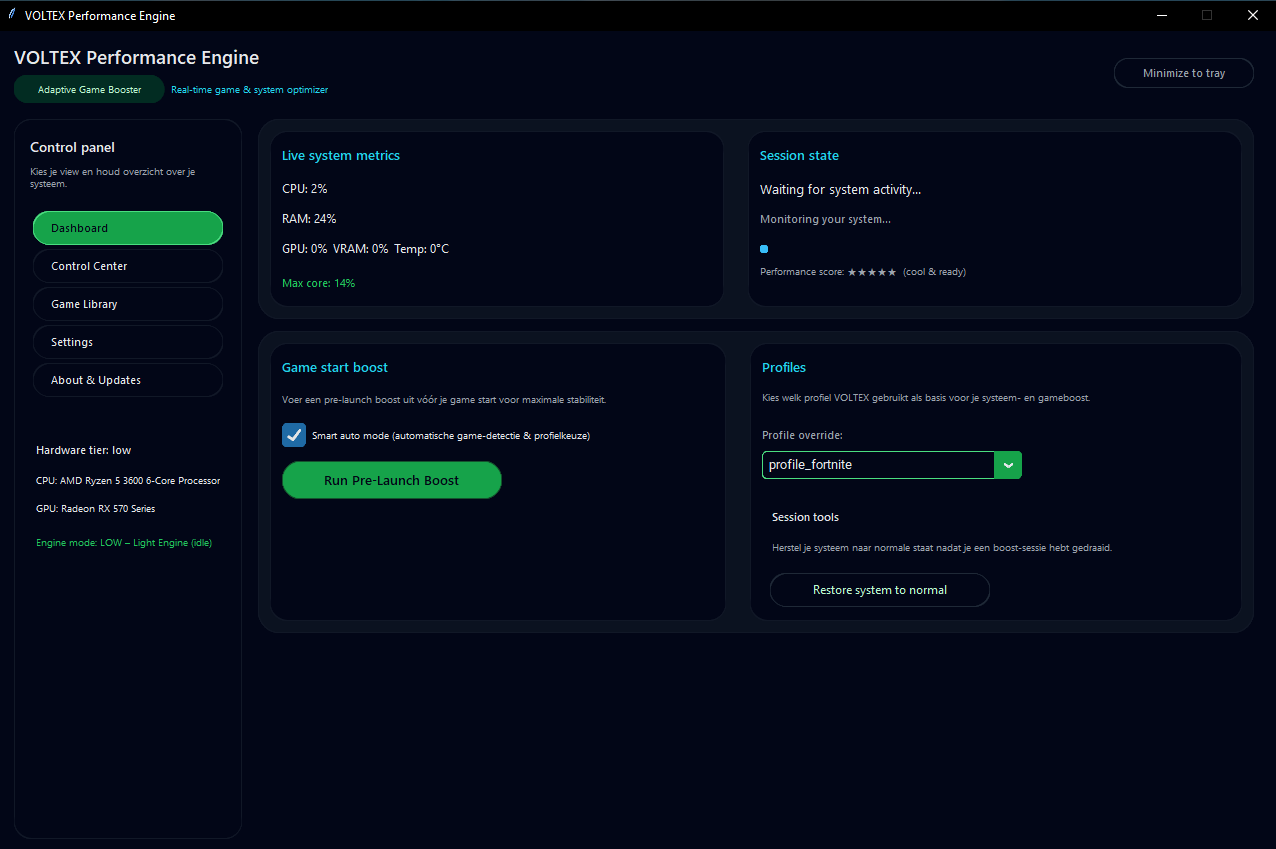
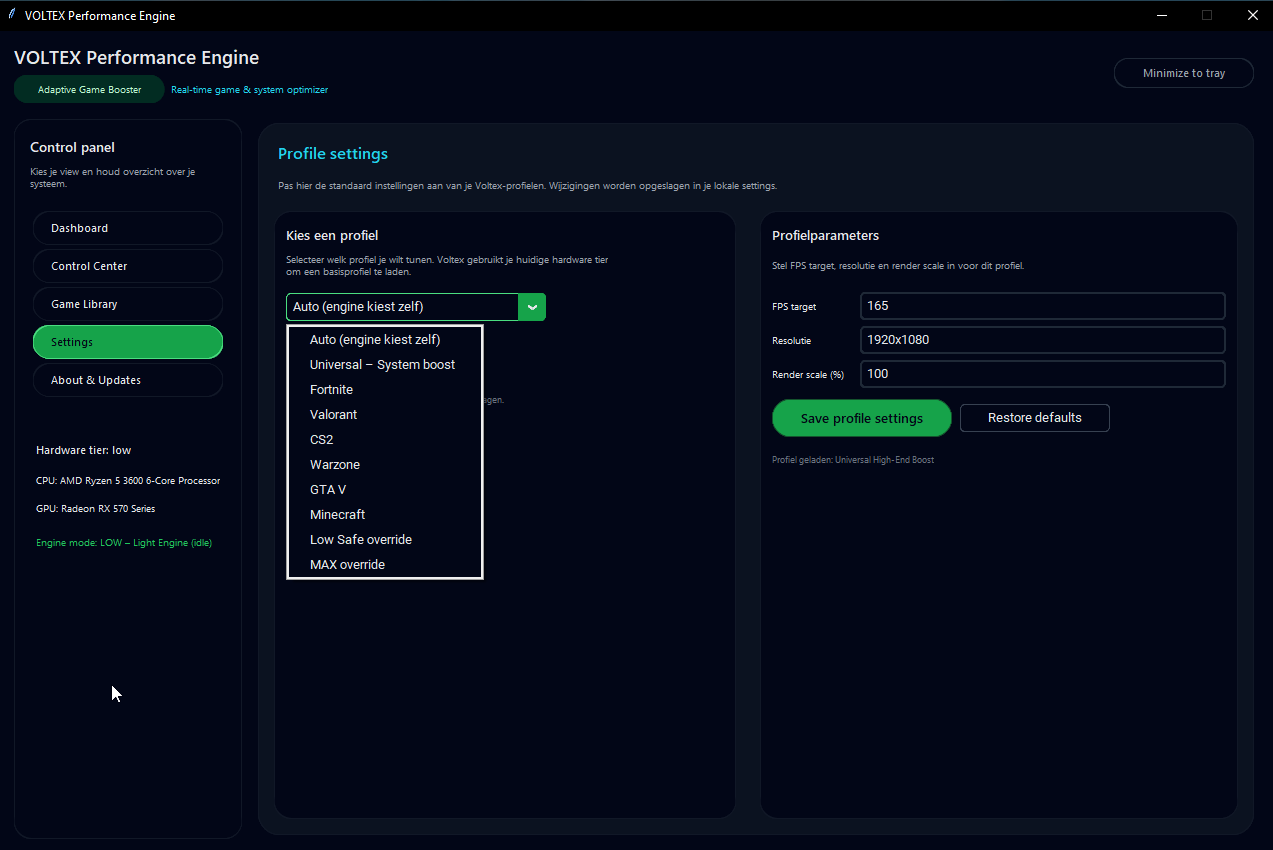
Real in-app screenshots from the Voltex Performance optimization tools running on Windows 10/11.
Clear pricing with a real trial.
No upsells, no bundle tricks. Just full access to the Voltex engine and all updates for a flat monthly fee.
- Full access to the Voltex Performance Engine – no feature limits.
- Smart Auto Game Booster & Pre-Launch Boost wizard.
- Adaptive Low-Stutter Engine (in-session CPU/RAM/GPU aware optimizer).
- Driverless CPU performance tweaks on your active power plan.
- Microsoft Defender optimization to reduce background scan impact.
- Anti-cheat awareness plus optional RTSS FPS limit integration.
- Per-game config tuning for Fortnite, Valorant, CS2, Warzone, GTA V and Minecraft.
- In-game benchmark mode with before/after reports.
- Session-based tweaks only – one-click restore to your previous state.
- Email support via support@voltexperformance.com.
Here’s what you get during the free trial and what continues afterwards.
| Feature | 3-day trial | Paid subscription |
|---|---|---|
| Core Voltex engine | Full access | Full access |
| Pre-Launch Boost | Included | Included |
| Adaptive in-session optimizer | Included | Included |
| Session restore & safety | Included | Included |
| benchmark & game reports | Included | Included |
| Updates & improvements | Included during trial | Included while active |
| License validity | 3 days | Ongoing (auto-renew) |
| Support | Email support | Priority email support |
After the 3-day trial, Voltex will ask for a valid license. If your Stripe subscription is active for your email address, your license stays valid automatically.
New project, solo developer, open about scanning.
Voltex is a young project built by a solo independent developer. Because the app is new and still building reputation, some security tools may show extra warnings at first – that does not automatically mean the software is harmful.
Solo-built and actively maintained
Voltex Performance Engine is developed and maintained by a single independent developer. There is no big company behind it – just a focused project aimed at making Windows gaming and general system responsiveness feel better, especially on mid-range hardware.
VirusTotal scan & transparency
Every public build is checked against multiple security engines. For full transparency, you can review the current VirusTotal report for this installer here:
View VirusTotal report for VoltexPerformanceEngine_Setup.exe
Some engines may temporarily classify new performance tools as “grayware” or “potentially unwanted” because they change system behavior (priorities, power plans, background tasks). Voltex does not contain malware and does not install hidden services or drivers.
No certificate yet (so SmartScreen may warn)
At this stage Voltex does not yet use a commercial code-signing certificate. This means Windows SmartScreen may show an “Unknown publisher” warning and some antivirus tools may display extra prompts until the app has built more reputation.
We are working towards adding official code signing as the project grows, and we have already submitted the installer to Microsoft for review and reputation whitelisting.
What Voltex does – and does not do
- Operates at OS level only – no game injections, no kernel-mode drivers.
- Uses documented Windows APIs for power, process and priority tuning.
- Does not modify game files or anti-cheat modules.
- Does not collect or sell personal data.
- Focuses on reversible, session-based tweaks with restore options.
If you have questions or concerns about security or detection, feel free to contact: support@voltexperformance.com.
Frequently asked questions.
Do I need a credit card for the 3-day trial?
Yes. To start your 3-day trial you complete the checkout via Stripe and choose one of the supported payment methods (for example credit card, PayPal or local payment options, depending on your region). You will not be charged €2,99 (or any amount) immediately – the 3-day trial starts first, and only after those 3 days will your subscription be billed if you decide to continue and don’t cancel.
How are payments processed?
All payments, invoicing and taxes are handled by Stripe as our payment processor. We never see or store your card or bank details.
Can I cancel my subscription?
Yes. You can cancel anytime via the “Manage subscription” link in your Stripe receipt email, the Stripe customer portal, or by contacting our support.
How does the license work?
Voltex uses an email-based license linked to the email address used at checkout.
Does Voltex make permanent changes to my system?
Voltex is built around session-based tweaks and can restore your previous state.
Is it safe with anti-cheat?
Voltex works at OS level only: no game injections, no kernel drivers, no direct modification of game files.
Terms & Conditions
These Terms apply to the use of the Voltex Performance application and this website.
1. Operator
These Terms & Conditions apply to the website voltexperformance.com and the Voltex Performance application operated by Voltex Performance.
Voltex Performance is the trading name of sole proprietor Giovanny Ramsaroe de Kok.
2. License and use
Voltex Performance is licensed, not sold. You are granted a personal, non-transferable, non-exclusive license to use the software on compatible Windows 10/11 systems.
- You may not resell, redistribute or publicly share your license.
- You may not reverse engineer or attempt to bypass license checks.
- Your license is linked to the email address used during purchase.
3. System requirements
Voltex targets modern 64-bit versions of Windows 10 and Windows 11.
4. No guaranteed results
Voltex is designed to improve responsiveness and stability by adjusting OS-level settings, but no specific performance increase is guaranteed.
5. Safety and limitations
Voltex focuses on reversible, session-based tweaks. However, Voltex Performance is not responsible for issues caused by unsupported system tweaks, overclocking, or conflicting third-party software/drivers.
6. Payments and billing
All payments are processed by Stripe.
7. Subscription model
Voltex uses a subscription model with a free 3-day trial for new users. After the trial, a recurring monthly fee is charged until cancelled.
8. Cancellations
You can cancel your subscription at any time using the “Manage subscription” link in your Stripe receipt email, the Stripe customer portal, or by contacting us.
9. Changes to these Terms
These Terms may be updated from time to time.
10. Contact
For questions about these Terms, contact:
support@voltexperformance.com
Privacy Policy
How Voltex Performance handles your personal data.
1. Who operates Voltex Performance
This website and the Voltex Performance application are operated by Voltex Performance.
2. Data we collect
- Your email address, used for license validation and transactional emails.
- Basic technical diagnostic information inside the app (non-sensitive logs).
3. Payments and billing
All payments are handled by Stripe as our payment processor.
4. How we use your data
- Validating and managing your Voltex license
- Sending transactional emails
- Complying with legal/fraud/tax requirements through Stripe
5. Contact
For privacy-related questions:
support@voltexperformance.com
Refund & Subscription Policy
How subscriptions, cancellations and refunds are handled for Voltex Performance.
1. Subscription model
- New users receive a 3-day full-feature free trial.
- After the trial, the subscription renews monthly (until cancelled).
2. Merchant of Record and billing
All subscription payments are processed securely by Stripe as our payment processor.
3. Managing your subscription
Cancel anytime via the “Manage subscription” link in your Stripe receipt email, the Stripe customer portal, or by contacting support@voltexperformance.com.
4. Refunds
Voltex Performance offers a full refund within 3 days of purchase for subscription payments, for any reason and without having to provide a justification.
5. Contact
support@voltexperformance.com
Ready to unlock the full Voltex Performance Engine?
Start 3-day trial — then €2,99/month